

This class prepares solution architects and engineers for the Claude Certified Architect – Foundations (CCAR-F) exam. A Claude Certified Architect designs and ships production applications with Claude, making sound tradeoff decisions across the Claude API, the Claude Agent SDK, Claude Code and the Model Context Protocol (MCP). The exam tests that judgment through realistic scenarios: customer support agents, multi-agent research pipelines, Claude Code in CI/CD, developer productivity tools and structured data extraction.
This Track Includes:
Building Production Applications with Claude – 5 Days
Duration
5 Days (40 hours: about 50% hands-on labs)
Description
This course teaches you to build agentic loops driven by stop_reason, orchestrate coordinator–subagent systems with the Agent SDK, and enforce business rules with hooks instead of prompts. You will design MCP tools with clear descriptions and structured errors, and configure Claude Code for a team with CLAUDE.md hierarchies, path-scoped rules, skills and slash commands.
You will also run Claude Code headless in CI/CD, produce schema-guaranteed output with tool_use and JSON schemas, and choose between synchronous and Message Batches processing. The final days cover context management, escalation design, error propagation, human review routing and source provenance. Every module ends with a lab and exam-style scenario questions mapped to the official CCAR-F blueprint.
Objectives
This course teaches participants the following skills:
- Implement agentic loops that continue on “tool_use” and stop on “end_turn”, avoiding text-parsing and iteration-cap anti-patterns
- Design hub-and-spoke multi-agent systems where a coordinator decomposes tasks, spawns parallel subagents via the Task tool and aggregates results
- Pass context explicitly to subagents using structured data that preserves source attribution
- Enforce critical workflow rules with programmatic prerequisites and Agent SDK hooks (PreToolUse/PostToolUse) rather than prompt instructions
- Manage sessions with –resume, fork_session and summary-based restarts
- Write tool descriptions that remove ambiguity between similar tools, and split or rename tools to eliminate overlap
- Return structured MCP errors (isError, errorCategory, isRetryable) and distinguish access failures from valid empty results
- Scope tools per agent and configure tool_choice (“auto”, “any”, forced)
- Configure MCP servers at project scope (.mcp.json with environment variable expansion) and user scope (~/.claude.json), and expose MCP resources
- Select the right built-in tool (Read, Write, Edit, Bash, Grep, Glob) for each exploration and editing task
- Organize CLAUDE.md across user, project and directory levels, with @import and .claude/rules/ path-scoped rules
- Build team slash commands and skills using context: fork, allowed-tools and argument-hint
- Decide between plan mode and direct execution, and use the Explore subagent to protect context
- Run Claude Code in CI with -p, –output-format json and –json-schema, and use independent review instances
- Reduce false positives with explicit criteria and 2–4 targeted few-shot examples
- Guarantee structured output with tool_use and JSON schemas, design nullable and enum fields, and build validation–retry loops
- Choose the Message Batches API for latency-tolerant work and handle failures by custom_id
- Preserve critical facts across long sessions with case-facts blocks, trimmed tool outputs, scratchpads and /compact
- Design escalation criteria, structured error propagation, confidence-calibrated human review and claim–source provenance
Course Outline
The course includes presentations, demonstrations, hands-on labs and scenario-based practice questions. Twelve modules cover all 30 task statements across the five exam domains; each module lists the blueprint task statements it maps to.
| Module | Exam domain | Task statements | Day | Time |
|---|---|---|---|---|
| 1. The Claude Platform for Architects | Foundation for all domains | — | 1 | 2.5 h |
| 2. Agentic Loops and Workflow Enforcement | D1 Agentic Architecture | 1.1, 1.4, 1.5 | 1 | 4 h |
| 3. Multi-Agent Orchestration and Sessions | D1 Agentic Architecture | 1.2, 1.3, 1.6, 1.7 | 2 | 3.5 h |
| 4. Tool Interface Design and Structured Errors | D2 Tool Design & MCP | 2.1, 2.2, 2.3 | 2 | 3 h |
| 5. MCP Integration and Built-in Tools | D2 Tool Design & MCP | 2.4, 2.5 | 3 | 2.5 h |
| 6. Configuring Claude Code for Teams | D3 Claude Code | 3.1, 3.2, 3.3 | 3 | 2 h |
| 7. Claude Code Workflows and CI/CD | D3 Claude Code | 3.4, 3.5, 3.6 | 3 | 2 h |
| 8. Prompt Engineering for Precision and Review | D4 Prompt Engineering | 4.1, 4.2, 4.6 | 4 | 2.5 h |
| 9. Structured Output, Validation and Batch Processing | D4 Prompt Engineering | 4.3, 4.4, 4.5 | 4 | 4 h |
| 10. Context Management in Long Sessions | D5 Context & Reliability | 5.1, 5.4 | 5 | 2 h |
| 11. Reliability: Escalation, Errors, Review and Provenance | D5 Context & Reliability | 5.2, 5.3, 5.5, 5.6 | 5 | 2.5 h |
| 12. Exam Readiness and Capstone | All domains | All | 5 | 2 h |
Module 1: The Claude Platform for Architects
- Map the four technologies on the exam: Claude API, Claude Agent SDK, Claude Code and MCP, and where each fits in a production design
- Explain the Messages API request/response cycle, system prompts, max_tokens and stop_reason values
- Describe tool use end to end: tool definitions, tool_use blocks, tool_result blocks
- Tour the six exam scenarios and the five domains with their weights
- Lab 1: Make your first tool-calling request and inspect every field of the response
Module 2: Agentic Loops and Workflow Enforcement
- Implement the agentic loop: send, inspect stop_reason, execute tools, append results, repeat
- Contrast model-driven tool selection with pre-configured decision trees
- Avoid loop anti-patterns: parsing natural language for completion, iteration caps as the main stop, checking for text content
- Explain why prompt instructions have a non-zero failure rate when compliance must be deterministic
- Build programmatic prerequisites, e.g. block process_refund until get_customer returns a verified ID
- Use hooks to intercept outgoing tool calls (block refunds over $500, redirect to escalation) and PostToolUse hooks to normalize timestamps and status codes
- Decompose multi-concern requests and compile structured handoff summaries for human agents
- Lab 2: Build a customer support agent (get_customer, lookup_order, process_refund, escalate_to_human) with a refund-threshold hook
Module 3: Multi-Agent Orchestration and Sessions
- Design hub-and-spoke systems where the coordinator owns decomposition, routing, error handling and aggregation
- Spawn subagents with the Task tool; include “Task” in allowedTools; configure AgentDefinition descriptions, prompts and tool restrictions
- Pass complete prior findings explicitly, since subagents do not inherit parent context
- Emit multiple Task calls in one response for parallel execution
- Partition scope to avoid duplication, and spot overly narrow decomposition
- Build iterative refinement loops: evaluate synthesis for gaps, re-delegate, re-synthesize
- Choose prompt chaining for predictable reviews versus dynamic decomposition for open-ended investigation
- Manage sessions with –resume <name>, fork_session, and fresh starts with injected summaries when tool results are stale
- Lab 3: Build a coordinator with web-search and document-analysis subagents running in parallel
Module 4: Tool Interface Design and Structured Errors
- Treat tool descriptions as the primary selection mechanism: inputs, example queries, edge cases, boundaries
- Fix misrouting by renaming and splitting overlapping tools (e.g. analyze_document → extract_data_points, summarize_content, verify_claim_against_source)
- Review system prompts for keyword-sensitive wording that overrides tool descriptions
- Return structured errors with isError, errorCategory (transient, validation, business, permission), isRetryable and readable messages
- Distinguish access failures from valid empty results
- Scope tools per agent (4–5, not 18), add narrow cross-role tools such as verify_fact, and set tool_choice auto, any or forced
- Lab 4: Redesign an ambiguous tool set and measure selection accuracy before and after
Module 5: MCP Integration and Built-in Tools
- Configure shared servers in project .mcp.json with ${ENV_VAR} expansion, and personal servers in ~/.claude.json
- Explain that tools from all configured servers are discovered at connection time and available together
- Expose content catalogs (schemas, issue summaries, doc trees) as MCP resources to cut exploratory calls
- Prefer community servers for standard integrations; build custom servers for team-specific workflows
- Choose Grep for content, Glob for paths, Read/Write for whole files and Edit for unique-anchor changes, with Read + Write as fallback
- Explore codebases incrementally: Grep for entry points, Read to trace imports
- Lab 5: Connect a project MCP server and a personal one; explore a legacy codebase with built-in tools
Module 6: Configuring Claude Code for Teams
- Apply the CLAUDE.md hierarchy: user (~/.claude/CLAUDE.md), project and subdirectory levels
- Diagnose instructions missing for teammates because they live at user level; verify loaded files with /memory
- Keep configuration modular with @import and topic files in .claude/rules/
- Write path-scoped rules with YAML paths globs (e.g. /*.test.tsx, terraform//*)
- Create project slash commands in .claude/commands/ and personal ones in ~/.claude/commands/
- Build skills in .claude/skills/ with SKILL.md frontmatter: context: fork, allowed-tools, argument-hint
- Choose skills for on-demand workflows versus CLAUDE.md for always-on standards
- Lab 6: Configure a repository with CLAUDE.md, path-scoped rules, a /review command and a forked skill
Module 7: Claude Code Workflows and CI/CD
- Choose plan mode for architectural, multi-file or multi-approach work and direct execution for well-scoped fixes
- Use the Explore subagent to isolate verbose discovery
- Refine iteratively with input/output examples, test-driven iteration and the interview pattern
- Decide when to send interacting issues together versus fixing independent issues one by one
- Run Claude Code headless with -p, and produce structured findings with –output-format json and –json-schema
- Use an independent review instance instead of self-review; pass prior findings to report only new issues; supply existing tests to avoid duplicates
- Lab 7: Add an automated PR review and test-generation job to a CI pipeline
Module 8: Prompt Engineering for Precision and Review
- Replace vague instructions (“be conservative”) with explicit categorical criteria
- Understand how high false-positive categories erode developer trust, and temporarily disable them
- Define severity levels with concrete code examples
- Write 2–4 few-shot examples that show reasoning for ambiguous cases and the exact output format
- Use few-shot examples to reduce extraction hallucination across varied document structures
- Split large reviews into per-file passes plus a cross-file integration pass; route findings by self-reported confidence
- Lab 8: Tune a code-review prompt to cut false positives without losing real bugs
Module 9: Structured Output, Validation and Batch Processing
- Define extraction tools with JSON schemas and read results from the tool_use block
- Use tool_choice “any” when the document type is unknown and forced selection to order steps
- Design schemas with nullable fields, “unclear” enums and “other” + detail patterns
- Separate syntax errors (removed by tool use) from semantic errors (totals that do not sum)
- Build validation–retry loops with specific error feedback, and recognize when retry cannot help
- Add self-check fields: calculated_total vs stated_total, conflict_detected, detected_pattern
- Use the Message Batches API (50% cost, up to 24 h, no mid-request tool calls) for latency-tolerant work; correlate by custom_id; resubmit only failures
- Lab 9: Build an invoice extraction pipeline with Pydantic validation and a 100-document batch run
Module 10: Context Management in Long Sessions
- Recognize progressive-summarization loss of numbers, dates and customer expectations
- Mitigate the lost-in-the-middle effect with key findings first and clear section headers
- Keep a persistent case-facts block outside summarized history
- Trim verbose tool outputs to relevant fields before they accumulate
- Use scratchpad files, subagent delegation, phase summaries and /compact in large codebase exploration
- Design crash recovery with exported agent state and a coordinator manifest
- Lab 10: Run a long multi-issue support session and keep every amount and order ID accurate
Module 11: Reliability: Escalation, Errors, Review and Provenance
- Set escalation triggers: explicit human requests, policy gaps or exceptions, no progress
- Explain why sentiment and self-reported confidence are poor escalation signals; ask for more identifiers on multiple matches
- Propagate structured errors (failure type, query attempted, partial results, alternatives); avoid silent suppression and whole-workflow termination
- Annotate synthesis output with coverage gaps
- Validate accuracy by document type and field; use stratified sampling and calibrated field-level confidence for review routing
- Preserve claim–source mappings, annotate conflicting statistics, and carry publication dates
- Lab 11: Simulate a subagent timeout and conflicting sources; produce a report with provenance and coverage notes
Module 12: Exam Readiness and Capstone
- Walk through all six scenarios and the reasoning patterns behind correct answers
- Practice spotting the “proportionate first step” versus over-engineered options
- Review the twelve official sample questions in depth
- Take a timed 60-question practice exam (120 minutes) with domain-level score feedback
- Capstone: Present an architecture for one scenario, defending each tradeoff
Day-by-Day Agenda
Each 8-hour day has 6.5 hours of modules and labs plus a 1.5-hour scenario clinic on that day’s domains.
| Day | Theme | Modules | Labs | Scenario clinic |
|---|---|---|---|---|
| 1 | Foundations and agentic loops | 1, 2 | Lab 1, Lab 2 | Customer Support Resolution Agent |
| 2 | Multi-agent systems and tool design | 3, 4 | Lab 3, Lab 4 | Multi-Agent Research System |
| 3 | MCP and Claude Code | 5, 6, 7 | Lab 5, Lab 6, Lab 7 | Code Generation with Claude Code; Claude Code for CI |
| 4 | Prompting and structured output | 8, 9 | Lab 8, Lab 9 | Structured Data Extraction |
| 5 | Reliability and exam readiness | 10, 11, 12 | Lab 10, Lab 11, Capstone | Developer Productivity with Claude; full practice exam |
Who Should Attend
This class is intended for the following job roles:
- Solution architects who design and implement production applications with Claude
- AI, ML and software engineers building agentic applications with the Claude Agent SDK
- Platform and DevOps engineers integrating Claude Code into team workflows and CI/CD pipelines
- Data engineers building document extraction and structured-output pipelines with Claude
- Technical leads and consultants at Anthropic partner organizations preparing for the CCAR-F credential
Prerequisites
To get the most out of this course, participants should have:
- Working proficiency in Python or TypeScript, including calling REST APIs and handling JSON
- Familiarity with Git, a command-line shell and a CI/CD system (e.g. GitHub Actions)
- Basic understanding of large language models and prompting
- Recommended: some hands-on time with the Claude API or Claude Code. The exam guide targets candidates with 6+ months of practical experience; this course compresses that ramp-up
Certification
Claude Certified Architect – Foundations (exam code CCAR-F)
| Exam detail | Value |
|---|---|
| Items | 60 multiple-choice and multiple-response |
| Structure | 4 scenarios drawn at random from a bank of 6 |
| Time limit | 120 minutes |
| Passing score | 720 scaled (range 100–1,000) |
| Delivery | Pearson VUE, online proctored or test center |
| Exam fee | $125 USD per attempt |
| Validity | 12 months; free online renewal if renewed on time |
| Registration | Anthropic Partner Academy, then schedule with Pearson VUE |
| Retakes | Wait 14, 30, then 90 days; max 4 attempts in 12 months |
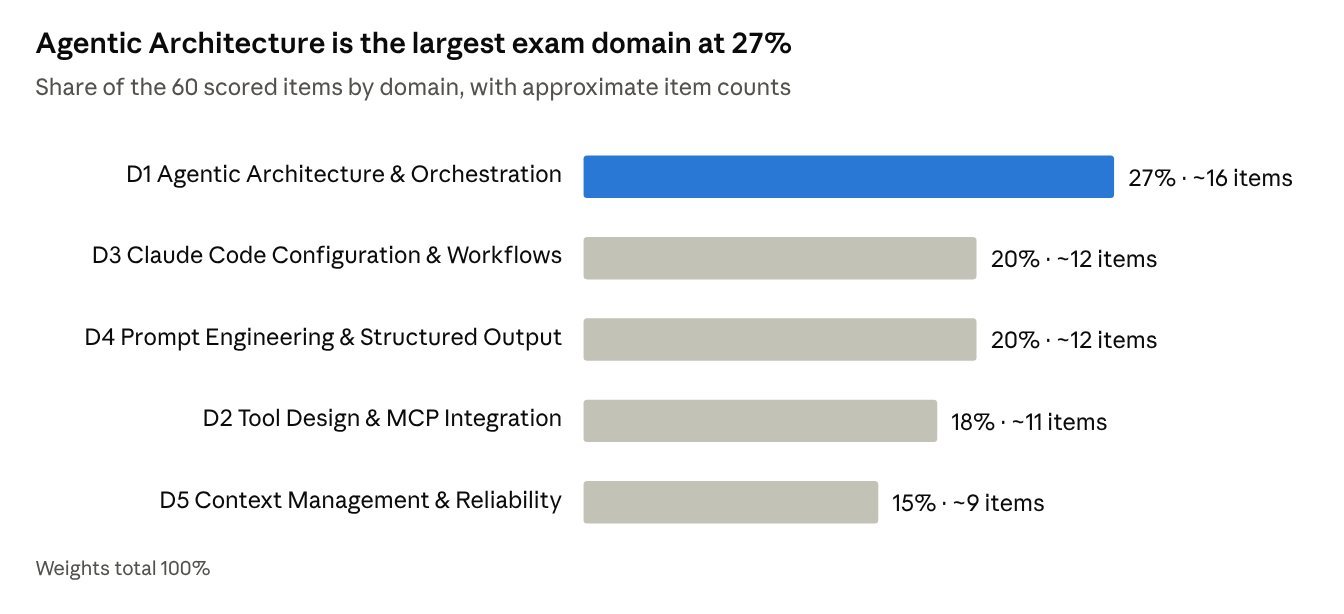
CCAR-F Exam Guide v1.0, Section 4 blueprint · item counts approximate
Course time follows the same weighting: Domain 1 gets two full modules on Days 1–2, and every domain gets its own lab and scenario clinic.
Course Schedule
Proposed weekday batches run Monday to Friday, one per month; a weekend batch covers the same 40 hours over five consecutive Saturdays. These dates are a draft for you to confirm.
| Batch | Format | Dates |
|---|---|---|
| Nov 2026 | Weekday (Mon–Fri) | 16–20 Nov 2026 |
| Dec 2026 | Weekday (Mon–Fri) | 14–18 Dec 2026 |
| Jan 2027 | Weekday (Mon–Fri) | 18–22 Jan 2027 |
| Feb 2027 | Weekday (Mon–Fri) | 15–19 Feb 2027 |
| Mar 2027 | Weekday (Mon–Fri) | 15–19 Mar 2027 |
| Apr 2027 | Weekday (Mon–Fri) | 19–23 Apr 2027 |
| May 2027 | Weekday (Mon–Fri) | 17–21 May 2027 |
| Jun 2027 | Weekday (Mon–Fri) | 14–18 Jun 2027 |
| Jan–Feb 2027 | Weekend (5 Saturdays) | 9, 16, 23, 30 Jan and 6 Feb 2027 |
| Apr–May 2027 | Weekend (5 Saturdays) | 3, 10, 17, 24 Apr and 1 May 2027 |
Open question: delivery mode (live online, classroom or both) and time zone for live sessions.
Course Fees
The course fee is yours to set; the exam fee is fixed by Anthropic at $125 USD per attempt and is paid separately at registration.
| Fee item | Amount | Includes |
|---|---|---|
| Course fee – individual (self-sponsored) | To be set | 5 days of instruction, 11 labs + capstone, lab code, slides, 60-question practice exam |
| Course fee – corporate (company-sponsored) | To be set | Same as individual, plus private batch option |
| Early-bird / group discount | To be set | Optional: e.g. 3+ seats from one company |
| CCAR-F exam fee | $125 USD per attempt | Paid via Anthropic Partner Academy; partner-tier discounts apply at checkout |
Open question: course fee currency (INR, USD or both) and whether the exam fee is bundled.
FAQs
Do I need my own Claude API access for the labs?
Yes. Each participant needs a Claude API key and Claude Code installed; lab usage costs are small but should be stated in the joining instructions.
Does the course include the exam voucher?
Not by default. Candidates register and pay $125 USD through the Anthropic Partner Academy and schedule with Pearson VUE.
How long is the credential valid?
12 months. On-time renewal is a free, non-proctored assessment; a lapsed credential means retaking the full exam.
What is not covered on the exam?
Fine-tuning, API billing and authentication, MCP server hosting, computer use, vision, streaming, rate limits, embeddings and prompt caching internals are out of scope, so the course does not teach them.
What if I fail?
You can retake after 14 days, then 30, then 90, up to 4 attempts in 12 months; each attempt carries the exam fee.
Sources
- Claude Certified Architect – Foundations Exam Guide, Version 1.0 (July 2026), attached PDF
- Course page template: Cloud Assist – Professional Machine Learning Engineer
